Lately, many blogs (including us) are facing this issue of being bombarded with invalid clicks on adsense ads – with an aim to get their adsense accounts blocked.
This activity is usually carried out by your rivals or those who are not happy with your existence, call it professional jealousy, personal grudge or any other possible thing.
So here are tips to track invalid adsense clicks, to make sure you are on safe side.
Frequently Monitor of your Adsense Account
- Make sure that you are monitoring your adsense account at least once a day, 3-4 times a day is even better.
- Keep a watch on CTR (Click through rate) – to make sure it’s around your daily average
- If your CTR goes significantly high, then it’s time to start worrying and to do the necessary to make sure you are safe.
If there’s an invalid click activity in your adsense account – there are chances that Google will suspend your account without asking you anything. You will be given only one chance to prove that the clicks were invalid, and didn’t originate from your computer or your friends’ computer.
Google may ask you for IP details or other logs that you may provide them in order to get your account reinstated.
We know that you have Google analytics installed but unfortunately Google Analytics doesn’t provide much details about the visitors, such as their IP addresses, exit links and so on.
So what to do in this situation?
- Register an account on statcounter.com (I am assuming you are familiar with basic setup, hence not going deep into details)
- Follow the wizard to add new project (i.e. is your website)
- Install the code on your website provided by statcounter.com – there’s an option to deploy invisible code (meaning that no counter button will be displayed)
- You are good to go…
You need to focus on exit link activity to make sure that clicks on ads are valid – and there’s nothing suspicious going on. For this, go to your statcounter account, open the project you just created and check for stats, exit link activity being most crucial of them:
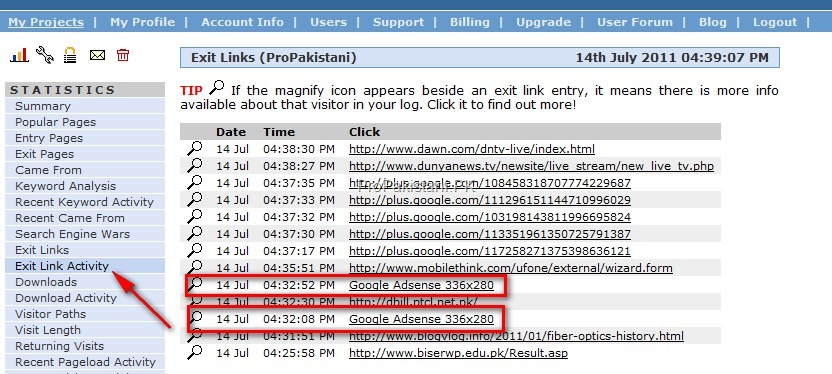
As you can see, there are two google adsense clicks – that ProPakistani has got in last few minutes. We can click on magnifier to see more details, such as IP address, referrer, and more.
Check below screen for one of visitor who clicked on adsense:
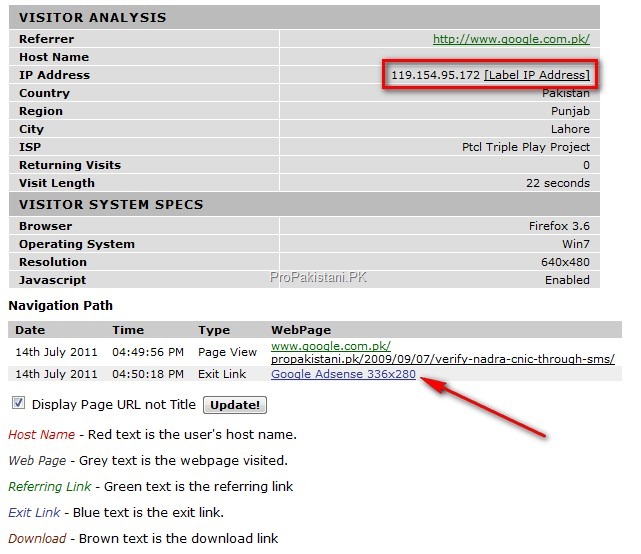
If you feel that Ad clicks are suspicious, and are coming from same IP with-in short interval of time – then note down the details, taking screenshots is even better and notify Google Adsense by clicking this link:http://www.google.com/support/adsense/bin/request.py?hl=en&contact_type=invalid_clicks_contact&rd=1
If you think someone is bugging you real hard, you may even try contacting FIA’s cyber crime wing with all the details. Contacting FIA’s cyber crime wing isexplained here.
A note to general readers:
If you are a legitimate reader, you don’t need to worry about anything about the tracking. This is done for the bad people only. You are one of millions of visitors on this website. We make sure that your visit history, cookies and all other details remain safe. Here’s our policy for further details on your privacy.


